
Mountain releases Displaypad & macropad modules
Create your own keys with the Displaypad and Macropad

Share this article...

WePC is reader-supported. When you buy through links on our site, we may earn an affiliate commission. Prices subject to change. Learn more
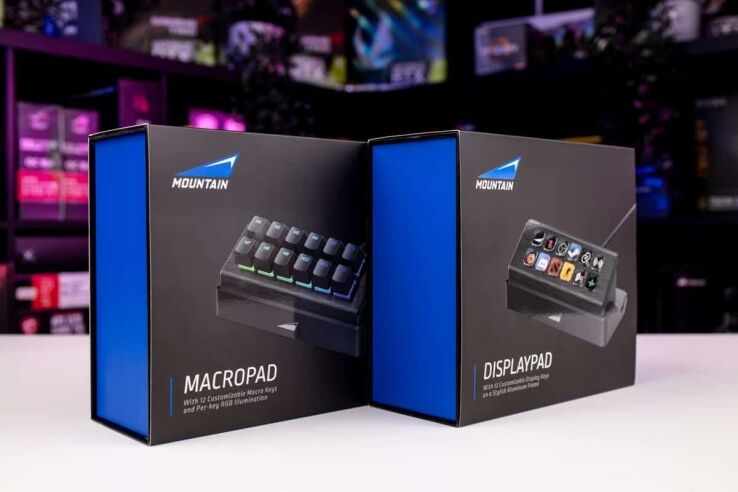
The Displaypad and Macropad from Mountain have been released to complement their existing modular ecosystem pioneered by their Everest line of gaming keyboards.
These two modules further expand the capabilities of the Mountain Everest keyboards, allowing for even more possibilities, both in work and play.
Both of these mount to any of the USB slots on the Mountain Everest Max/Core keyboards, and also come with their own stands to make them easy to with any setup.
The Displaypad and Macropad each add a new angle to your keyboard, be it one from Mountain themselves, or another brand. We’ll start with the Displaypad, as that’s our personal favorite.
Mountain Displaypad
The Displaypad appears to be taking aim at stream deck devices such as the OG Elgato Streamdeck and Loupedeck Live.
It features a similar design and feature set, with 12 keys arranged in a 2×6 grid, each of which can be bound to a specific function or shortcut.


Much like the original Elgato Streamdeck each of these buttons is actually a miniature screen. This means that you can assign each one its own function, and its own image. And yes, you can make the images anything you want, so, do with that info what you will.
It’s worth noting here that you will need the Base Camp companion software in order to customize the Displaypad.
These functions can be anything, by the way. The buttons can open webpages or folders, run programs or run system commands, and even complex macro commands.
The Displaypad currently retails for $109.99, making it considerably cheaper than the Elgato alternative.

Mountain Macropad
Next up is the more traditional style of Macropad, featuring 12 additional keys, also arranged in a 2×6 grid.

These can be assigned to the same range of functions as the display pad, but they come at a significantly lower cost, retailing at $59.99.
This makes it an ideal budget option for those of you who want the functionality of the Displaypad, but don’t need custom images.
Additionally, each of the keys utilizes the Mountain Tactile 55 key switches, meaning that this is probably the most enjoyable macropad out there, feeling almost as good as the Mountain Everest 60 we loved so much.


And with these switches, you of course get a full RGB light show that can be synced up with other Mountain peripherals via Mountain’s Base Camp software, or as a simple illumination addition to your desk.
Both of these additions help to expand your potential both in terms of play and productivity, and they can both be found on the official Mountain website.


