
How to get ChatGPT plugin access
Here's how to access ChatGPT plugins and more!

Share this article...

WePC is reader-supported. When you buy through links on our site, we may earn an affiliate commission. Prices subject to change. Learn more
Today we’re going to be checking out how to get ChatGPT plugin access – and everything you need to know about this new feature. ChatGPT has been a resounding success, becoming a phenomenon in the quickly advancing world of AI.
That’s why we’re excited to try out some plugins which may leave the likes of Google Bard in the dust (for now). OpenAI say that using plugins allows the artificial intelligence to gather more information than it ever could before with it’s trained data.
First off though, we’ll need to access these new ChatGPT plugins, so let’s get down to how it’s done.
How to get access to ChatGPT plugins
How exactly can you take advantage of this new feature rolling out from the guys over at OpenAI? Well, ChatGPT plugins must be accessed by joining the plugins waitlist. You can follow the link just below to check this out!
This is the best way to get access to the ChatGPT plugins as soon as possible. There’s plenty of documentation and plugins to read about while you’re in the waiting list too!
Simply visit the page above and click ‘Join plugins waitlist’. You will then be prompted to enter some information and have the chance to describe how you’ll be using plugins. By joining the waitlist, you’re given the opportunity to provide OpenAI with valuable feedback of your experience as well as make some suggestions of your own.

How ChatGPT plugins work
These ChatGPT plugins open up more possibilities for the largely (unsurprisingly) chat-based AI. By adding plugins into the mix, the bot can gather up more knowledge and pull in more information to supplement it’s human-like response. This creates an enhanced experience for the user and makes sure all the information they need is in one place.
OpenAI have already demonstrated how plugins will affect your ChatGPT experience. From the initial announcement, we can find a quick example of using a plugin over on Twitter.
In one example below, the user requests a recipe for a vegan meal. With the Instacart plugin active, which allows users to order from local grocery stores, ChatGPT puts together a shopping list for a chickpea salad with the list of ingredients all ready to buy.

You can already imagine how other plugins can take advantage of the power of ChatGPT just from this early demonstration.
ChatGPT plugins list
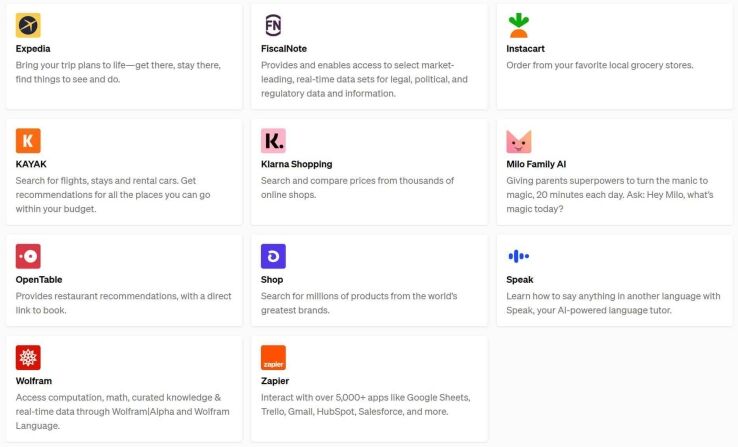
Initially, there are 11 plugins to play around with. If the integration of plugins with ChatGPT proves to be a success, then we will likely see this list grow to feature many more popular brands and tools. Below is a list of the starting 11 of ChatGPT plugins.
- Expedia
- FiscalNote
- Instacart
- KAYAK
- Klarna Shopping
- Milo Family AI
- OpenTable
- Shop
- Speak
- Wolfram
- Zapier
How to get ChatGPT plugin access : Final word
That just about wraps up everything you need to know about ChatGPT plugins for the time being. We expect to see this exciting technology develop more in the coming weeks and months. As more people get access through the waitlist, that means more feedback (and more plugin developers) coming OpenAI’s way.
We’re covering as much as we can on ChatGPT throughout all of it’s development, so don’t forget to check out even more tips and guides.


